Creating a pseudolog from well logs
Use the Create Pseudolog from Wells tool to calculate logs for planned wellbores, based on raw log data from selected source wellbores.
The Pseudolog from Wells tool can be found in:
When you have a planned well with no log data available, you can use the raw log data from a selected set of source wellbores to calculate a pseudolog for the target wellbore and use that information to define the drilling program. You can also use the mapped data to run e.g. a geomechanical analysis or create a hydraulic fracturing design.
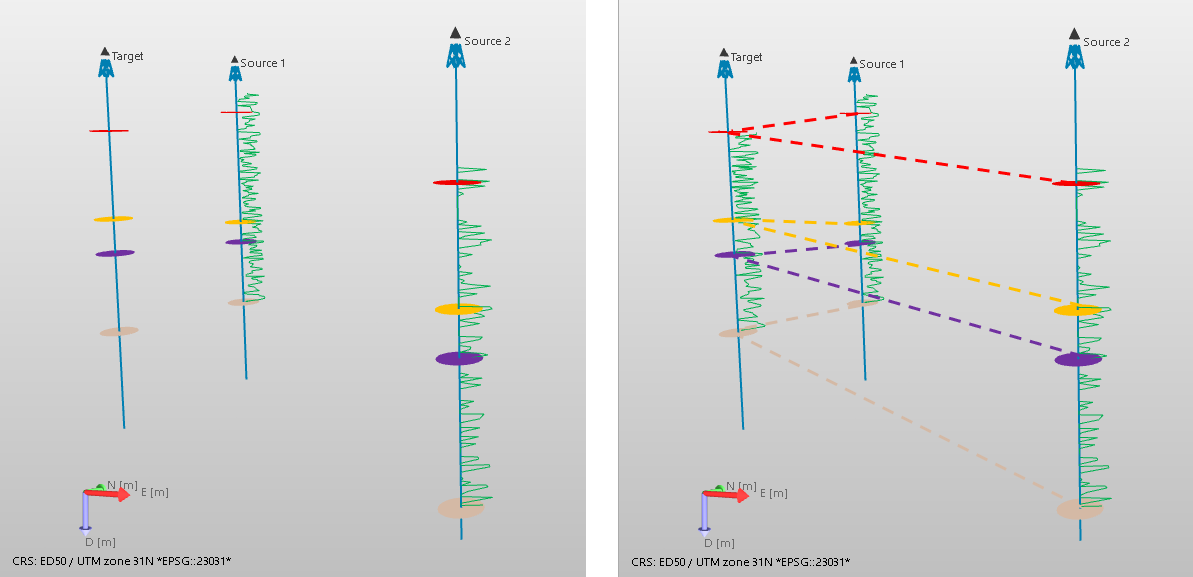
Before and after creating a pseudolog for a target wellbore. The markers are used to generate mapping intervals. click to enlarge
To calculate the pseudolog for the target wellbore, a source wellbore, source log and a marker set are required as inputs, but you can also use multiple target wellbores, source wellbores and source logs. The pseudolog is calculated using TVD or MD based log stretching or squeezing, using a common marker set to indicate the mapping intervals. If you have selected multiple source wellbores, and have selected to use weight factors, the resulting pseudolog will be the weighted average. For more information on the calculations, see About the calculations.
If you do not have markers for the target wellbore, you can create markers using one of the following options:
- Use the Markers from Surfaces tool (prepare > Wells > Marker Tools).
- Use the Marker Table (Workspace > Views): copy and paste information from another wellbore.
- Create a text file and import it (data > Wells > Markers).
 To create a pseudolog:
By default, all the wellbores are listed on the form, both in the target wellbores table and in the source wellbores table. If you have wells in a well group, you can select a well group from the drop-down list at the top of the table. The selected well group will act as a filter, and only the wellbores that belong to the well group are listed. You can select multiple wellbores at once.
- Select a target wellbore (you can select multiple target wellbores). As soon as a wellbore is selected as a target wellbore, the wellbore is removed from the source wellbores table.
- Select the source wellbore(s). As soon as a wellbore is selected as a source wellbore, the wellbore is removed from the target wellbores table.
- From the source logs table, select the logs that you want to use as input and create a pseudolog for. Only the logs that are available for all the selected source wellbores are listed.
- Select a marker set. Upon selection, a validation is done to check if all the markers in the marker set are present in the selected wells. If all the markers are missing, a warning icon is shown for that well, indicating that all markers are missing, but you will not be blocked to continue.
-
To do proper projection mapping from the source wellbore to the target wellbore, the target and the source wellbore need to have specified intervals. All the horizon markers in your marker set that appear in the target wellbore are used to create the default mapping intervals listed on the form. Then, for the source wellbores, the same amount of intervals is created based on the markers available in the source wellbore(s). The top and base of the intervals for your target wellbore and the source wellbore do not have to match.
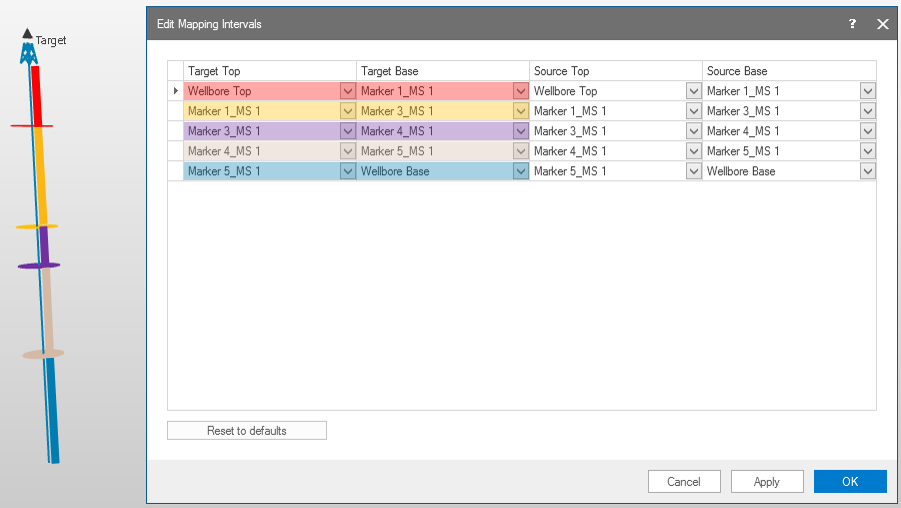
Mapping intervals are based on the available horizon markers in the target well. click to enlarge
You can manually change the listed intervals using the markers in the drop-down lists. In the drop-down list, all available markers (horizon, fault, fluid level, unconformity, etc) in the marker set are listed. You can remove and add rows using the context menu. Upon clicking Apply, the intervals are validated: for the target wellbore you are not allowed to have overlapping intervals, you must use markers in the correct MD sequence, and you cannot select one marker to be the top and the base of an interval.
A top or base of an interval is set to undefined when a marker is not available in all the source wells. For these intervals, the pseudolog is not calculated, but null values/unknown classes are used instead.
Once you are done setting up your mapping intervals, click OK to close the form and return to the Pseudolog from Wells form.
- When you select multiple source wellbores, the well head distance weighted and confidence weighted options are available.
- Resampling/ No resampling - When you select multiple source wellbores, you have to set a resampling interval. By default, a sampling interval of 1 ft is used. When you have only one source wellbore selected, the No resampling option is available for selection. If you have selected one source wellbore and checked the no resampling option, the sampling in the target wellbore is done based on the stretching factor.
- Method - Select which calculation method to use: TVD or MD. For more detailed information, see About the calculations.
- Log suffix - The pseudolog that is created will have the suffix that you enter in the entry field.
- Click Apply to save your changes, create the pseudolog and keep the form open, or click OK to save your changes, create the pseudolog and close the form. The newly created log(s) will be available in the JewelExplorer under Well Data > Wells > target wellbore(s) and under Well Data > All Logs.
Well head distance weighted (optional) - When you check this option, the lateral distance of the source wellbore head to the target wellbore head is used to calculate the weight factor of the different wells.
Confidence weighted (optional) - When you check this option, the Confidence Weight column is activated, allowing you to enter a value to express the weight factor of each wellbore. Wellbores which you assign a higher weight have more influence than wellbores that you assign a smaller weight. A valid weight is nonnegative.
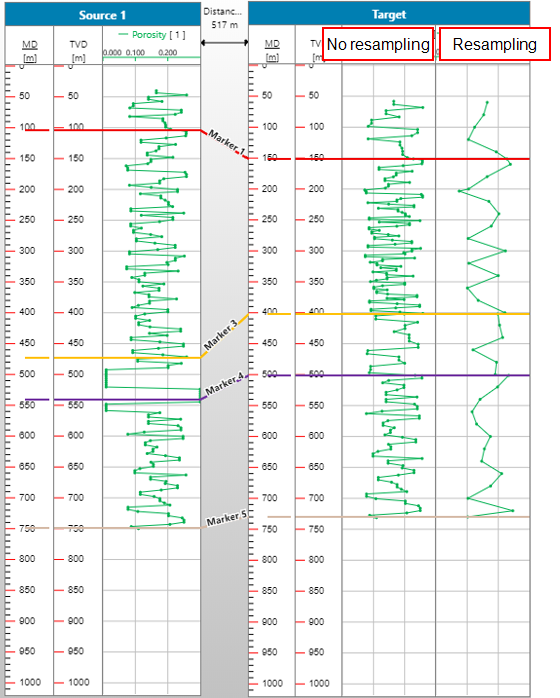
With only one source wellbore selected, the option no-resampling is available. You can also set a user-defined resampling interval. click to enlarge
The calculation of the pseudologs is divided in three steps:
-
- The projected logs are then resampled using the Resampling interval that you have specified. If you have selected only one source wellbore and the No-resampling option, the projected sampling distance is used for the pseudolog.
- When you have 2 or more source wellbores, averaging is applied. For continuous source logs, arithmetic mean averaging is used to calculate the pseudolog. For discrete logs, most occurring is used. The wellhead distance weighted and confidence weighted weight factors are used if you have selected them on the form.
There are a few restrictions when your selected calculation method is TVD and the target or source wellbore is an uphill well.
- If the target wellbore is a deviated well going uphill, and you do not use an inflection point on the Edit Mapping Intervals form, JewelSuite will use the well survey information to calculate the deepest point of the well. This point is then used to mirror the log on the uphill section (see image below).
- If the target wellbore is a deviated well going uphill, the calculations are stopped at the second inflection point.
- If the source wellbore is a deviated well going uphill, the deepest point is the last point that can be used. The uphill section, from the deepest point upwards, is not used.
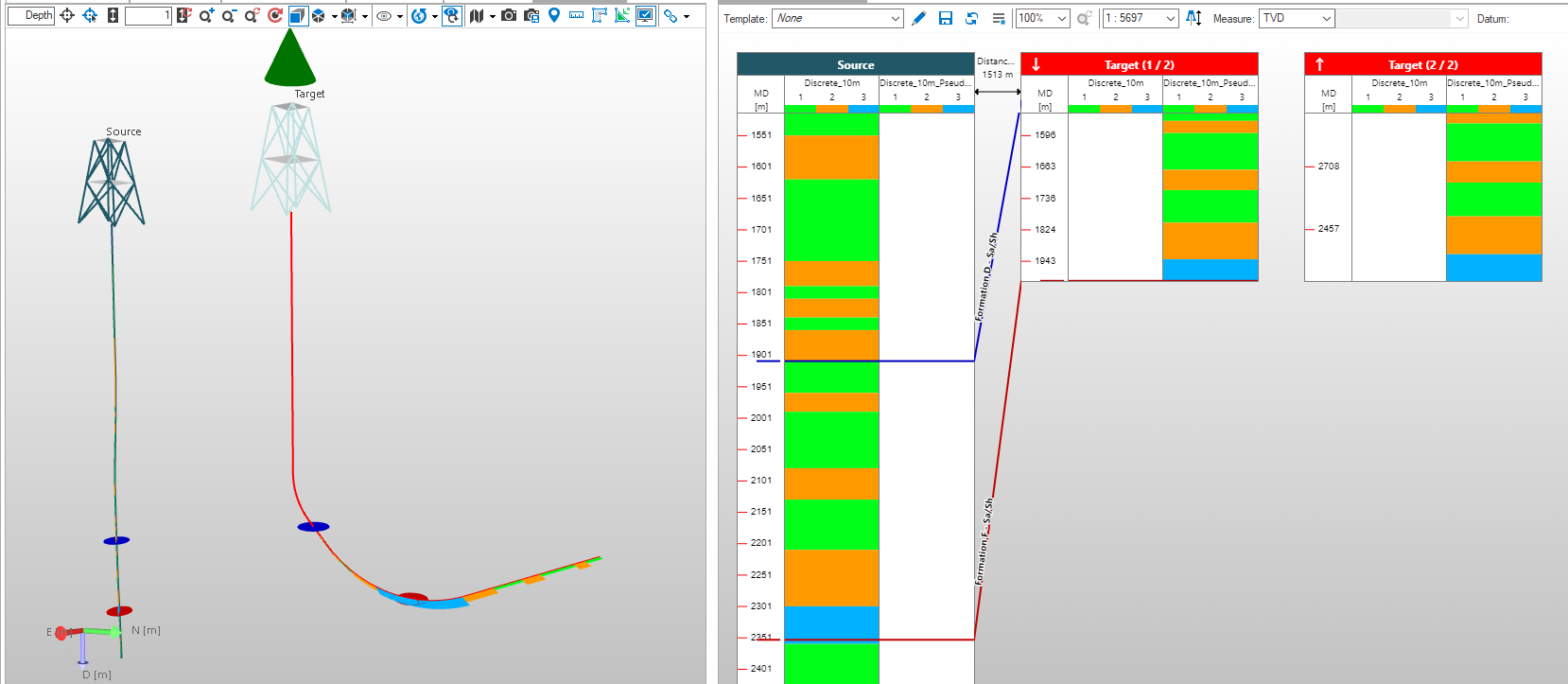
Example of mirroring the log for the uphill part of the target wellbore, both in the 3D View and in the Well View. click to enlarge